Video Streaming

Video Streaming

Video Streaming lets your IoT devices send a live video feed to the /IOTCONNECT™ portal, so you can watch what a camera-equipped device sees in real time — right next to its sensor data. The portal supports two modes: AWS Kinesis Video Streams and WebRTC, so you can choose reliable buffered playback or the lowest-latency real-time view.

What is Video Streaming?

Video Streaming is the ability for a connected device with a camera to send a live video feed to /IOTCONNECT™. Instead of only seeing numbers from your sensors, you also see what is actually happening — live, in the portal.

This pairs visual context with your telemetry, which is useful for:

Remote monitoring of distant or hard-to-reach locations.

Security and compliance through live visual verification.

Equipment and quality oversight — see machine status alongside its readings.

Faster troubleshooting — observe conditions directly instead of guessing from data.

Video streaming is supported on four device types: Device, Edge, Gateway, and Edge Gateway.
Two Streaming Modes

Video Streaming Modes

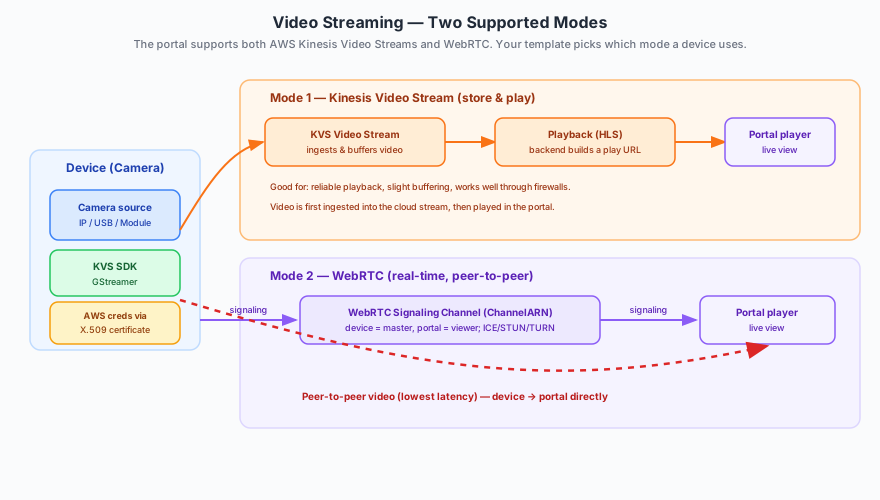
/IOTCONNECT™ can stream video in two ways. Both are built on AWS Kinesis Video Streams; you choose the mode that fits your use case when you configure the device template.

Kinesis Video Stream mode: The device pushes video into a cloud video stream, which ingests and buffers it. The portal then plays it back. This mode is reliable and firewall-friendly, with a small amount of buffering latency — great for steady monitoring and when you want the stream recorded in the cloud.

WebRTC mode: The device and your browser connect through a signaling channel and then stream video peer-to-peer — the same technology video-call apps use. This gives the lowest latency (near real-time), ideal when you need to react immediately to what you see.

Both modes appear the same in the portal — you simply open the device and watch the live feed. The difference is how the video travels under the hood.

How a Device Gets Its Stream Credentials

Device Video Credential Flow

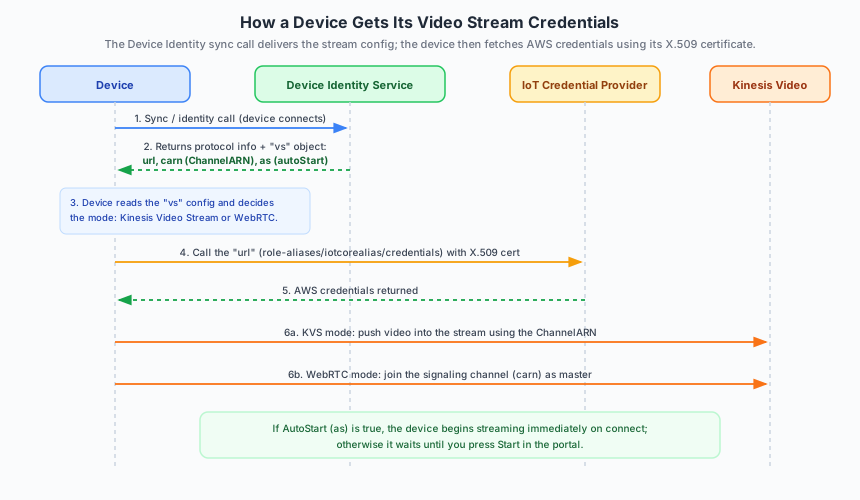
A device never stores permanent cloud keys. Instead, it receives everything it needs through the Device Identity service sync call when it connects, and then fetches AWS credentials using its X.509 digital certificate. Here is the exact flow:

1. The device makes its sync / identity call when it connects to the platform.

2. The service returns a video-stream config (the vs object) alongside the usual protocol details. It contains three things: url (where to fetch credentials), carn (the Channel ARN for WebRTC signaling), and as (the auto-start flag).

3. The device reads the config and knows which mode to use and which channel/stream it belongs to.

4. The device calls the credential url — the credential endpoint (role-aliases/iotcorealias/credentials) — authenticating with its X.509 digital certificate.

5. It receives AWS credentials in return, so nothing sensitive is stored long-term on the device.

6. The device starts streaming: in Kinesis Video Stream mode it pushes video into the stream; in WebRTC mode it joins the signaling channel (using the Channel ARN) as the master.

Only devices whose template has a valid video configuration receive the vs object, so the credential path is granted exactly to the devices that need it.

The Video Config (vs) Delivered to the Device

In the sync response, the video configuration is delivered as a compact vs object. Each field tells the device something specific:

url — the credential endpoint the device calls (authenticating with its X.509 certificate) to get AWS credentials for the video stream.

carn — the Channel ARN that identifies this device’s WebRTC signaling channel (used in WebRTC mode).

as — the auto-start flag. If true, the device begins streaming as soon as it connects; if false, it waits for you to press Start in the portal.

Behind the scenes this comes from the device template’s stream settings — the stream resource (Kinesis Video Stream or WebRTC), the stream type (IP, USB, or Module based), and the auto-start toggle.

Stream Types

Alongside the mode, you choose a Stream Type that matches the camera hardware on your device:

IP Based: For network cameras and IP-enabled video devices that stream over network protocols (such as RTSP).

USB Based: For USB cameras and webcams plugged directly into the device.

Module Based: For integrated camera modules built into the IoT device.

Setting It Up & Watching in the Portal

Video streaming follows /IOTCONNECT™’s usual template-then-device pattern, so a whole fleet can be configured consistently.

Enable on the template: Turn on video streaming, choose the mode (Kinesis Video Stream or WebRTC), pick the Stream Type, and set Auto Start.

Create devices from the template: Devices inherit these settings; you can override the Stream Type or Auto Start per device.

Watch in the portal: Open the device properties page to use Start / Stop controls, see the stream status, and watch the live video display.

Review activity: The Activity section logs streaming sessions, connection events, and usage history.

ⓘ NOTE

The portal supports both Kinesis Video Stream (buffered playback) and WebRTC (real-time peer-to-peer) modes. The device receives its stream config (url, carn, as) in the Device Identity sync response and fetches credentials from the credential endpoint using its X.509 digital certificate — no permanent keys are stored on the device. For Kinesis Video, the device side runs on Linux — both Raspberry Pi OS (Debian) and Ubuntu 22 are supported — with GStreamer and the AWS KVS Producer SDK, using a USB or RTSP camera.