Conversation – SM

Conversation with SageMaker

Some models in /IOTCONNECT™ are prepared by Amazon SageMaker instead of being uploaded manually. When a model is flagged for SageMaker, the platform hands the model off to SageMaker in the background, which converts and prepares it for deployment. This page explains how /IOTCONNECT™ and SageMaker work together, step by step.

How It Works

Conversation with SageMaker

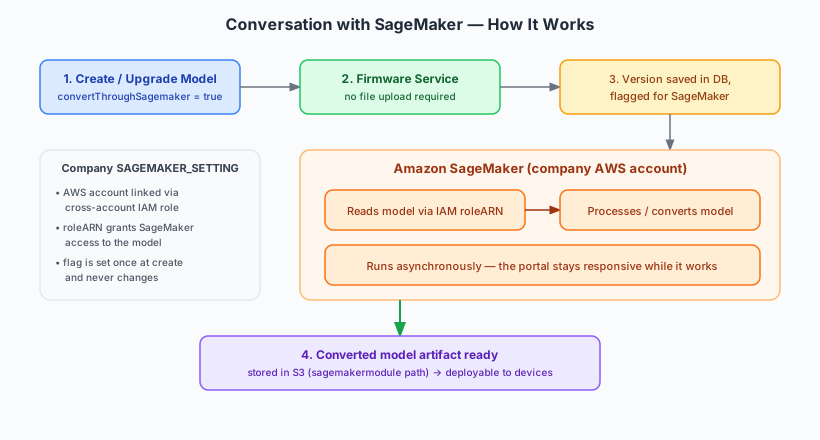
When a model is marked for SageMaker processing, /IOTCONNECT™ does not expect you to upload a finished model file. Instead, it records the model and lets SageMaker do the heavy lifting. The diagram above shows the full exchange; the steps below explain each part.

Step-by-Step

1. Flag the model for SageMaker: When creating a model, the admin or user turns on the SageMaker option. This tells the platform that SageMaker will handle this model’s transformation. The flag is set once and never changes for that model.

2. No file upload needed: Because SageMaker produces the final artifact, you can create the model (and later add new versions) without uploading a file. You only provide the version details.

3. The version is recorded: /IOTCONNECT™ saves the model version in its database and marks it as SageMaker-processed.

4. SageMaker processes the model: Using the company’s SageMaker settings, SageMaker reads the model, converts or prepares it, and produces the deployable artifact. This runs asynchronously, so the portal stays responsive the whole time.

5. Ready to deploy: The finished artifact is stored and becomes available to deploy to edge devices, just like any other model.

What SageMaker Needs (Company Settings)

For SageMaker to act on a model, the company must have its SageMaker settings configured. These settings connect /IOTCONNECT™ to the company’s own AWS environment securely:

Linked AWS account: The company’s AWS account is connected through a cross-account IAM role.

Role permissions (roleARN): The IAM role grants SageMaker permission to read the model and perform the conversion.

Storage routing: SageMaker-processed artifacts are stored in a separate location from standard uploaded models, keeping the two cleanly organized.

If SageMaker settings are not yet configured, the model is still created — the flag is simply metadata — but actual SageMaker processing only happens once the settings are in place.

ⓘ NOTE

The SageMaker flag is chosen when the model is created and cannot be changed afterward. SageMaker-processed models can add new versions without a file upload, and all processing happens asynchronously in the company’s own AWS account via a secure IAM role.