
Certificate Rotation

Certificate Rotation

Certificate rotation is the process of replacing expiring or compromised certificates with new ones to maintain continuous secure communication between your devices and /IOTCONNECT™. Proper rotation planning ensures zero downtime during certificate transitions and keeps your IoT infrastructure secure.

Why Rotate Certificates?

Certificate rotation is a critical security practice for IoT deployments. There are several reasons to rotate certificates regularly:

Certificate Expiration: All certificates have a finite validity period. When a CA certificate expires, all devices authenticated by it lose connectivity. Proactive rotation prevents service disruption.

Security Best Practice: Regular rotation limits the window of exposure if a certificate’s private key is compromised. Shorter-lived certificates reduce the risk of long-term credential misuse.

Compliance Requirements: Many security standards (ISO 27001, SOC 2, NIST) mandate regular cryptographic key and certificate rotation as part of security policy.

Key Compromise Response: If you suspect a CA private key has been compromised, immediate rotation is required to prevent unauthorized device authentication.

Algorithm Upgrades: Rotating certificates allows you to upgrade to stronger cryptographic algorithms (e.g., moving from RSA 2048 to RSA 4096 or ECC P-384).
Rotation Process

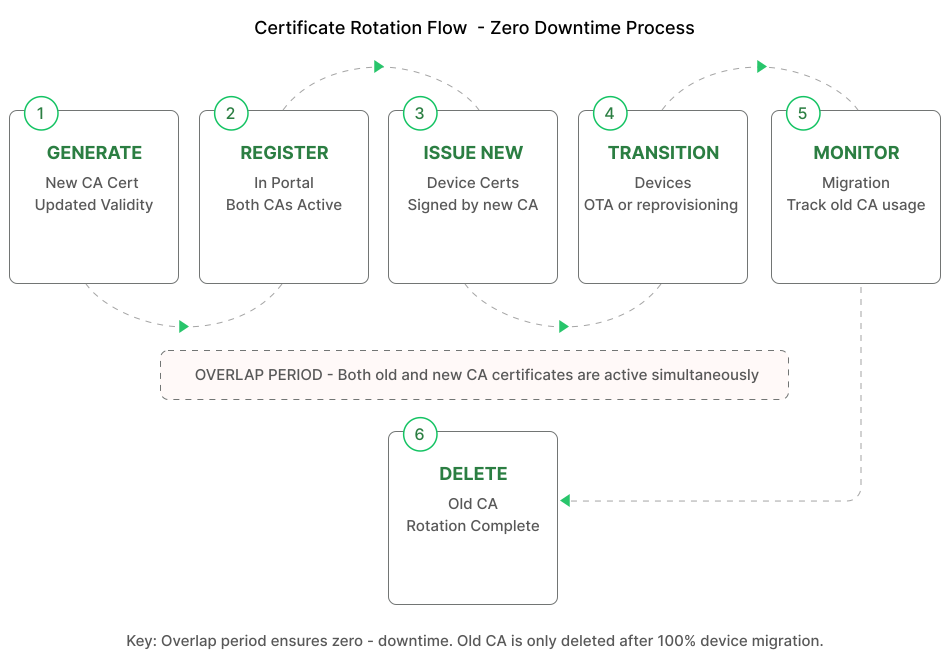
The certificate rotation process in /IOTCONNECT™ follows a parallel-trust approach where both the old and new certificates are active simultaneously during the transition period. This ensures no device loses connectivity during rotation.

High-Level Rotation Flow

1. Generate a new CA certificate with an updated validity period.

2. Register and verify the new CA certificate in /IOTCONNECT™ (both old and new are now active).

3. Begin issuing new device certificates signed by the new CA.

4. Gradually transition devices to use new certificates (via OTA or next provisioning cycle).

5. Monitor that all devices have transitioned to the new certificate.

6. Once all devices are using the new CA, delete the old CA certificate.

This overlap period ensures seamless transition without requiring coordinated downtime across your device fleet.

Automatic vs Manual Rotation

/IOTCONNECT™ supports both automatic and manual certificate rotation approaches:

Automatic Rotation

Expiry Notifications: The platform sends alerts when certificates approach their expiry date (configurable threshold, default 30 days).

Device Certificate Renewal: Devices using the SDK can request new certificates automatically before their current certificate expires.

Rolling Updates: Combined with OTA firmware updates, new device certificates can be distributed automatically to the fleet.

Manual Rotation

Planned Maintenance: Schedule rotation during maintenance windows with full control over the transition timeline.

Emergency Rotation: Immediately register a new CA and revoke the compromised one in response to a security incident.

Compliance Audits: Perform rotation as part of scheduled security reviews with documented procedures.

Rotating Without Downtime

Zero-downtime rotation requires careful planning to ensure devices maintain connectivity throughout the transition. Follow these best practices:

Overlap Period: Always register the new CA certificate before deactivating the old one. Maintain both as active for the entire transition window.

Gradual Migration: Transition devices in batches rather than all at once. Start with a small test group to verify the new certificate works correctly.

Dual Certificate Support: Configure devices to accept both old and new CA certificates for server validation during transition.

Monitoring: Track device connectivity metrics during rotation. If connection failures spike, pause the rotation and investigate.

Rollback Plan: Keep the old CA certificate active until you confirm 100% of devices have migrated. This provides an instant rollback path.

Steps in the Portal

To perform certificate rotation in the /IOTCONNECT™ portal:

Step 1: Navigate to Security → Certificates and click Create Certificate.

Step 2: Upload your new CA certificate and complete the verification process (proof-of-possession).

Step 3: Update your enrollment groups to reference the new certificate (or add the new certificate as a secondary).

Step 4: Begin issuing new device certificates signed by the new CA for new devices and device re-provisioning.

Step 5: For existing devices, push new device certificates via OTA or wait for their next re-provisioning cycle.

Step 6: Monitor the certificate dashboard to track how many devices still use the old CA.

Step 7: Once no devices reference the old CA, delete it from the portal to complete the rotation.

The entire process can be completed without any device experiencing disconnection, provided the overlap period is maintained.

ⓘ NOTE

Start the rotation process at least 30 days before certificate expiry. This provides sufficient time to transition all devices without rushing. Set up expiry notifications in the portal to receive automated alerts when certificates approach their end-of-life date.