
OTA Updates

OTA Updates

/IOTCONNECT™ Over-The-Air firmware updates push new firmware to devices remotely. OTA enables you to upgrade device software, patch vulnerabilities, and deploy new features without physical access to devices in the field.

Overview


OTA (Over-The-Air) is the process of remotely updating firmware on connected IoT devices through the /IOTCONNECT™ platform. Instead of physically accessing each device, you can push new firmware versions from the cloud to one or thousands of devices simultaneously.

Why OTA is needed: IoT devices deployed in the field require regular software updates for security patches, bug fixes, and new feature delivery. Manual updates are impractical at scale, making OTA essential for production IoT deployments.

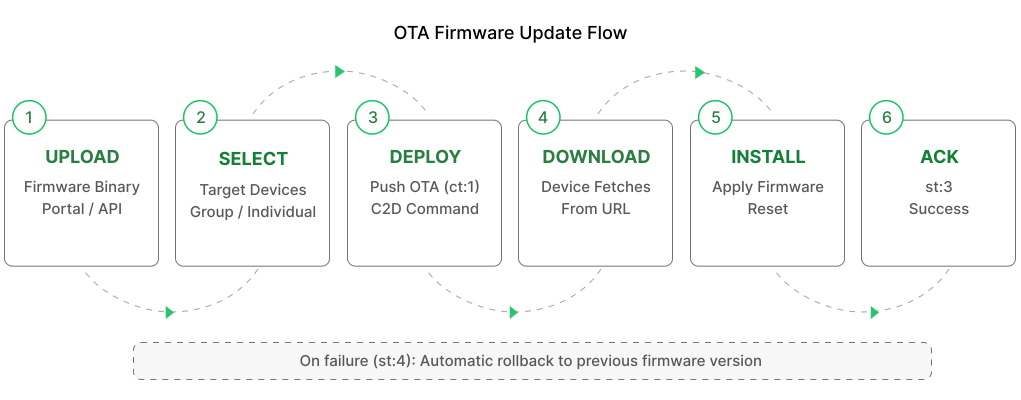
How it works:

Upload Firmware: Upload your compiled firmware binary to the /IOTCONNECT™ portal with version metadata.

Select Devices: Choose target devices individually, by group, or by template for the update.

Deploy: Push the firmware update to selected devices. The platform sends a C2D command with download URL.

Device Downloads and Installs: The device receives the OTA command, downloads the firmware binary from the provided URL, and installs it locally.

Acknowledges: The device sends an acknowledgement back to the platform reporting the update status (success or failure).

Quick Start

Follow these steps to deploy an OTA firmware update to your devices in /IOTCONNECT™:

Step 1: Create Firmware in Portal — Navigate to the Firmware section and create a new firmware entry with a descriptive name and target template.

Step 2: Upload Binary File — Upload your compiled firmware binary file (.bin, .hex, or other supported format) to the firmware entry.

Step 3: Set Hardware / Software Version — Specify the hardware version compatibility and the new software version number for tracking.

Step 4: Select Target Devices — Choose which devices should receive this update. Select individually, by device group, or all devices on a template.

Step 5: Schedule Deployment — Optionally schedule the deployment for a specific time window, or push immediately.

Step 6: Monitor Rollout Status — Track deployment progress in real time. View which devices have downloaded, installed, and acknowledged the update.

OTA Command JSON

The device receives this JSON on the C2D topic when an OTA update is pushed from the portal.

OTA Acknowledgement

Send this acknowledgement on the ack topic to report OTA status.

Video Walkthrough: Firmware Creation & OTA Update (Over the Air) to Device

Watch the complete walkthrough video showing the end-to-end process of creating a firmware package and performing an OTA (Over the Air) update to a device using the IoTConnect platform.

Video Walkthrough: Firmware OTA (Over the Air) | Online

Watch the complete walkthrough video showing the end-to-end process of configuring and initiating an online Firmware OTA update and validating the update status with the IoTConnect platform.

Video Walkthrough: Firmware OTA (Over the Air) | Offline

Watch the complete walkthrough video showing the end-to-end process of configuring and performing an offline Firmware OTA update and validating the update status with the IoTConnect platform.

ⓘ NOTE

OTA supports scheduling, rollback on failure, and group targeting. Monitor deployment progress in the Firmware section.