
Greengrass Device – Introduction

Greengrass Device

/IOTCONNECT™ Greengrass brings cloud intelligence to the edge. Deploy software components to your Linux-based devices, process data locally, act on events in real time, and sync seamlessly with the cloud — all managed from a single portal with no AWS IAM credentials required on the device.

What is a Greengrass Device

A Greengrass Device is an edge computing device that runs the AWS IoT Greengrass runtime — allowing it to execute application logic locally while maintaining a managed connection to /IOTCONNECT™ in the cloud.

Think of it this way: A regular IoT device sends raw sensor data to the cloud for processing. A Greengrass device processes data locally first — filtering noise, running ML models, responding to events instantly — and then sends only meaningful results to the cloud.

The key difference:

Regular Device: Sensor → Cloud → Process → Respond (high latency, always needs internet)

Greengrass Device: Sensor → Local Processing → Instant Response + Cloud Sync (low latency, works offline)

/IOTCONNECT™ abstracts the complexity of AWS IoT Greengrass setup. Instead of manually configuring IAM roles, policies, certificates, and deployments in the AWS Console, you do everything from the /IOTCONNECT™ portal in a few clicks.
When should you use Greengrass

Greengrass is the right choice when your use case requires any of the following:

Local processing: You need to filter, aggregate, or transform data before sending it to the cloud.

Low latency response: Actions must happen in milliseconds (e.g., safety shutdowns, quality control).

Offline operation: Devices must continue working when internet connectivity is intermittent or unavailable.

Edge ML inference: Run machine learning models locally on sensor data without cloud roundtrips.

Protocol translation: Your sensors use legacy protocols (Modbus, BACnet, OPC-UA) and need local translation.

Gateway scenarios: One powerful device aggregates data from many constrained child devices.

Managed software updates: You need to deploy, update, and rollback application code remotely.

ℹ️ Note

When NOT to use Greengrass: If your device simply reads a sensor and sends the value to the cloud every few minutes with no local logic needed, a standard /IOTCONNECT™ device (using the regular SDK) is simpler and sufficient.

Greengrass Lite vs Greengrass Classic

/IOTCONNECT™ supports two Greengrass runtimes. Choose based on your device’s hardware capabilities:

Feature Nucleus Classic Nucleus Lite
Runtime Language Java C (lightweight)
Memory Footprint ~200MB minimum ~15MB minimum
Requirements Java 11+, Python 3.9+, venv Linux with basic toolchain
Best For Raspberry Pi, x86 PCs, powerful MPUs STM32MP, NXP i.MX, constrained devices
Component Support Full AWS public components Custom and /IOTCONNECT™ components
Local Lambda Supported Not supported
Installation Single script with Java installer Platform-specific installer script
Target OS Ubuntu, Debian, Amazon Linux OpenSTLinux, Yocto, Ubuntu minimal

Decision Guide:

If your device has 512MB+ RAM and Java support → Choose Nucleus Classic

If your device is memory-constrained or runs embedded Linux → Choose Nucleus Lite

Key Concepts

Before diving into setup, understand these core concepts:

Greengrass core Device: Your physical Linux device running the Greengrass Nucleus runtime. It connects to /IOTCONNECT™ via MQTT and manages local components.

Component: A software module deployed to your device. Components run applications, collect telemetry, handle commands, and communicate with /IOTCONNECT™. Written in Python (or any language for Classic).

Recipe: A YAML or JSON file that describes a component — its name, version, dependencies, installation steps, and runtime configuration. Think of it as a Dockerfile for Greengrass.

Artifact: The actual application code (zip file) referenced by a recipe. Contains Python scripts, binaries, ML models, or any files needed by your component.

Package: A collection of components bundled together for deployment. In /IOTCONNECT™, a Package groups one or more components with a template.

Deployment: The act of pushing a Package (with selected components) to one or more target devices. Deployments are tracked with status: pending, successful, or failed.

IPC (Inter-Process Communication): The local pub / sub messaging system between components on the same device. Components publish telemetry on IPC topics that the /IOTCONNECT™ SDK picks up and sends to the cloud.

Template: Defines the data schema (attributes) and actions (commands) for your Greengrass devices. Components must send data matching the template attributes.

Typical Use Cases

Industrial monitoring: Raspberry Pi gateway collects data from PLCs via Modbus, processes locally, sends aggregated metrics to cloud dashboards.

Smart agriculture: Field devices monitor soil moisture and trigger irrigation locally even without internet, syncing data when connectivity returns.

Predictive maintenance: Edge ML model detects vibration anomalies on factory equipment and triggers alerts in under 100ms.

Fleet management: Vehicle gateways running Greengrass aggregate GPS, fuel, and engine telemetry from multiple CAN bus sensors.

Retail / Building: Energy monitoring hubs process HVAC sensor data locally and only send hourly summaries to reduce bandwidth costs.

Supported Hardware

Device Runtime OS Notes
Raspberry Pi 4/5 Classic or Lite Ubuntu 24.xx ARM64 Most common dev board
x86 PC / VM Classic Ubuntu 22.04+ Development and testing
ST STM32MP135F-DK Lite OpenSTLinux 6.0+ Requires Starter Package flash
ST STM32MP157F-DK2 Lite OpenSTLinux Cortex-A7 dual core
ST STM32MP257F-DK/EV1 Lite OpenSTLinux Next-gen MPU
NXP FRDM i.MX 93 Lite Yocto Scarthgap 6.6 ARM MPU, embedded Linux

Complete Device Lifecycle

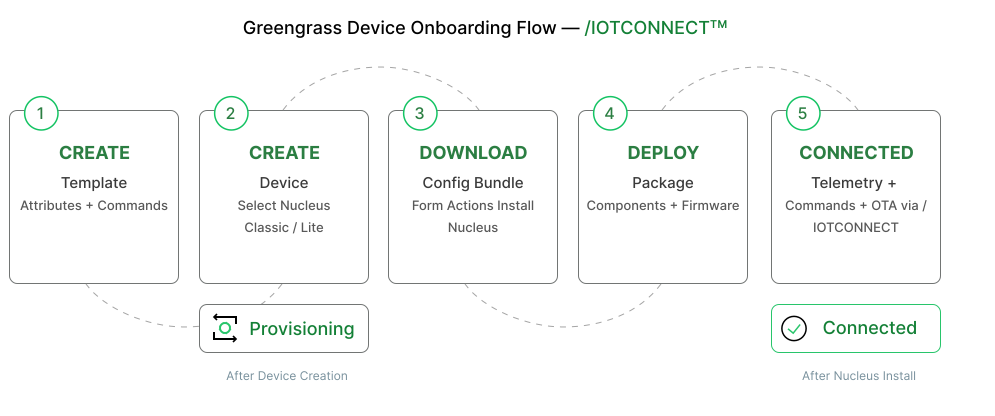
The complete lifecycle of a Greengrass device in /IOTCONNECT™ follows this flow:

1. Create Template — Define what data the device will send (attributes) and what commands it can receive.

2. Create Device — Register the device in /IOTCONNECT™ with a Unique ID, select template, and choose Nucleus type.

3. Download Bundle — Download the connection kit (certificates + configuration) from the device list.

4. Install Nucleus — Transfer the bundle to your physical device and run the installer script.

5. Device connection — The Nucleus starts, authenticates with certificates, and the device shows as Connected in the portal.

6. Create Component — Write or download a component (application code + recipe) that generates telemetry.

7. Create Package — Bundle components together and associate with a template.

8. Deploy — Push the package to the device. The component starts running and sends telemetry.

9. Monitor — View live telemetry, check device health, execute commands, and review diagnostics.

10. Update — Deploy new component versions, add components, or rollback as needed.

Architecture Overview

The architecture shows how components interact at each layer:

Layer What Happens
Cloud Layer /IOTCONNECT™ Portal → manages devices, templates, packages, deployments, telemetry storage, commands
Communication MQTT over TLS (port 8883) with X.509 certificate authentication
Greengrass Nucleus Runtime on the device — manages component lifecycle, IPC, deployments, certificate rotation
IoTConnect SDK Component Pre-installed component that bridges IPC messages to /IOTCONNECT™ cloud protocol (Message 2.1)
Custom Components Your application code — reads sensors, processes data, publishes telemetry to IPC topics
Physical Sensors/Actuators Connected via GPIO, I2C, SPI, UART, Modbus, or network protocols

Communication Pattern:

Your custom component publishes JSON data to the IPC topic iotc/rpt/d2gg/sub. The /IOTCONNECT™ SDK component subscribes to this topic, validates the data against the template schema, and forwards it to the cloud via MQTT. Commands flow in reverse — cloud sends to SDK component, which publishes to an IPC topic your component subscribes to.

Video Tutorials

Watch the complete walkthrough videos to understand the end-to-end onboarding process for both Greengrass deployment options.

🎥 Greengrass Classic Setup


This walkthrough covers creating a Greengrass Classic device, installing
AWS IoT Greengrass Nucleus Classic, deploying components, verifying the
connection, and viewing live telemetry in the platform.

🎥 Greengrass Lite Setup


This walkthrough demonstrates Greengrass Lite on resource-constrained
devices, including bundle download, running the installer script,
connecting the device, and validating the first telemetry.

What's Next

Now that you understand the concepts, proceed to the next sections:

Quick start guide — Get your first Greengrass device connected and sending telemetry in

approximately 15 minutes.

Device registration — Detailed walkthrough of creating templates and registering devices.

Package management — Learn how to create, deploy, and manage components.

SDK Development — Build custom components with the /IOTCONNECT™ Greengrass SDK.

Troubleshooting — Common issues and their solutions.

ⓘ QUICK START

Zero-code setup in 15 minutes:
1. Import example template from the SDK GitHub repo
2. Create a device (select Nucleus Classic or Lite)
3. Download the connection kit from the device list
4. Run the installer on your device
5. Deploy the pre-built Basic Demo component

Telemetry flows without writing any code. See the Quick Start Guide for step-by-step instructions.