
Model Hub

Model Hub

The Model Hub is the central library for AI and firmware models in /IOTCONNECT™. Platform administrators create models once and publish them so every account can use them, while each company can also build and manage its own models. This page walks through the complete end-to-end flow — from an admin adding a model to a user deploying it to edge devices.

End-to-End Flow

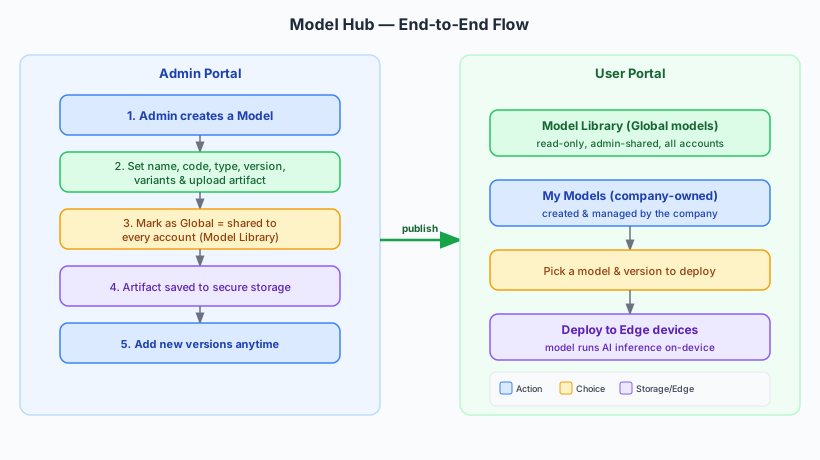
Model Hub End-to-End Flow

The Model Hub connects two portals. Platform administrators work in the Admin Portal and publish models to everyone; end users work in the User Portal and consume those models alongside their own. The diagram above shows the full path — the steps below explain it in plain language.

What is a Model?

A model is a packaged AI or firmware artifact that a device can run — for example an anomaly detector or a classification model. In the Model Hub, every model has:

A name and code: a friendly name and a short unique code to identify it.

A type: the kind of model it is (for example an AI model), which controls how it is handled.

Versions: a model improves over time, so you can add new versions while keeping the full history.

Variants: optional labels (such as an edge-optimized build) for different device targets.

How an Admin Adds a Model and Shares It

Platform administrators work in the Admin Portal. When an admin creates a model and marks it as global, it becomes available to every account on the platform. Here is the flow:

Step 1 — Create the model: The admin enters the name, code, type, first version, and any variants.

Step 2 — Add the artifact: The model file is uploaded, and the platform safely moves it into secure storage in the background.

Step 3 — Publish as global: Marking the model as global shares it with all accounts. It then appears in every company’s Model Library as a read-only entry.

Step 4 — Add versions over time: The admin can publish new versions whenever the model improves, and every account automatically sees the latest version.

Model Library vs My Models

In the User Portal, every company sees two groups of models:

Model Library: The global models published by platform admins. These are available to everyone and are read-only — a company can use them but cannot change them.

My Models: The models a company creates and manages itself. These are private to that company.

From either group, a user picks the model and version they want and deploys it to their edge devices, where it runs AI inference locally.

ⓘ NOTE

Global models are created by platform administrators and shown to every account as read-only in the Model Library. A company can always create and fully manage its own models under My Models. Some models are prepared by Amazon SageMaker — see Conversation with SageMaker for how that works.