
Commands

Commands

/IOTCONNECT™ Commands enable you to send cloud-to-device commands for remote control and configuration. Execute actions on connected devices in real time from the portal, REST API, or automated rule engine triggers.

Overview

Commands in /IOTCONNECT™ are predefined actions that can be sent from the cloud to a connected device for remote control and configuration. Commands are defined in the device template and become available for execution once a device is connected.

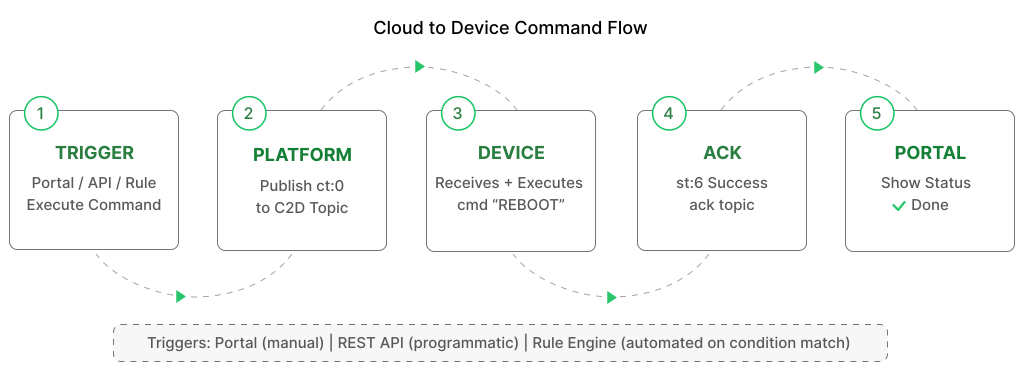
When a command is executed, the platform publishes a JSON message to the device’s C2D subscribe topic. The device receives the message, processes the command, and optionally sends an acknowledgement back to confirm execution status.

Commands can be triggered from:

Portal: Navigate to the device’s Commands tab and execute manually with optional parameters.

REST API: Programmatically send commands via the /IOTCONNECT™ API for integration with external systems.

Rule Engine: Automatically trigger commands when telemetry conditions are met (e.g., turn on cooling when temperature exceeds threshold).

Quick Start

Follow these steps to send a command to your device in /IOTCONNECT™:

Step 1: Define Commands in Device Template — Navigate to Devices > Templates, open your template, and add commands with a name and optional parameter requirement.

Step 2: Create Device with Template — Create a device that uses the template containing your command definitions.

Step 3: Connect Device — Ensure your device is online and subscribed to its C2D topic using the /IOTCONNECT™ SDK or custom MQTT client.

Step 4: Navigate to Commands tab — Open the device detail page and click the Commands tab to see available commands.

Step 5: Select Command from List — Choose the command you want to execute from the list of defined commands.

Step 6: Enter Parameter if Required — If the command requires a parameter value, enter it in the input field.

Step 7: Click Execute — Click the Execute button to send the command to the device immediately.

Step 8: Monitor Acknowledgement — If acknowledgement is enabled, monitor the command history for device response and execution status.

Command JSON

The device receives this JSON on the C2D subscribe topic when a command is executed.

Command Acknowledgement

Send this on the ack topic to confirm command execution status.

Video Walkthrough: Cloud to Device Flow [C2D]

Watch the complete walkthrough video showing the end-to-end process of sending commands from the IoTConnect platform to a connected device and validating the Cloud-to-Device (C2D) communication flow.

ⓘ NOTE

Commands can be triggered from portal, REST API, or automatically by the Rule Engine. Parameter-required commands accept a value when executed.